
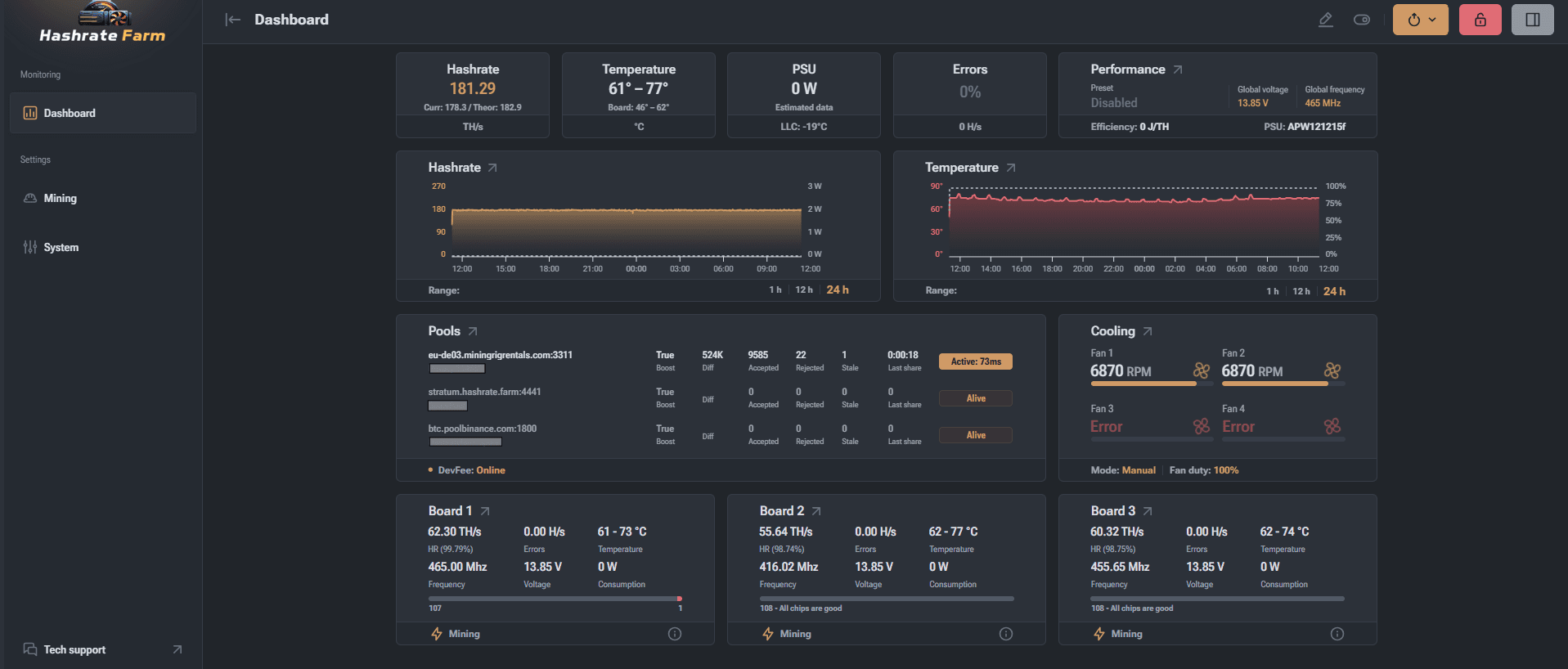
How Custom ASIC Firmware (Like Vnish) Solves Antminer Problems, Stock Firmware Cannot
Factory Bitmain firmware is built for uniform datacenters. When a fan flakes, a board weakens, or chips drift hot, stock logic often stops the whole machine. Hashrate Farm distributes custom Antminer firmware for operators who need granular control, diagnostics, and graceful degradation—especially on busy farms.
If you have ever watched a perfectly good Antminer drop to zero because one fan tach failed—or because a single hash board threw a chain error—you already know the frustration: stock firmware optimizes for “all green sensors, all boards nominal.” Real racks are messier. Heat spikes, weak chips, borderline PSUs, and flaky temperature probes happen every week in the field.
The firmware builds we publish are distributed through Hashrate Farm Antminer firmware downloads (Mining Hub)—optimized images you can install over factory software or use to update an existing custom stack, with per-model packages for air, hydro, and immersion variants.
This article explains why custom ASIC firmware (often called aftermarket Antminer firmware) matters for ASIC troubleshooting, what those Hashrate Farm builds add that Bitmain’s factory images usually omit, and which troubleshooting keywords map to those features when you are googling at 2 a.m.
Warranty and safety: Flashing third-party firmware can void manufacturer warranty and carries electrical/thermal risk if you push voltage or clocks without monitoring. Use official images from the firmware vendor, validate checksums, and staged-test one machine before you fleet-roll. This is educational context—not installation instructions for a specific serial.
Why stock firmware feels “brittle” on a real farm
Factory tuning assumes rows of identical miners, balanced airflow, and healthy parts. Protection logic is blunt by design: if a protection trip fires—fan error, over-temperature, missing hash chain, abnormal sensor readings—the safest default is often to stop hashing entirely. That keeps silicon from cooking, but it also means:
- One dead fan can idle a whole rig even when passive or alternate cooling could carry the load.
- One degraded board can break the entire “machine OK” state even when two boards are still profitable.
- Marginal silicon may show low hashrate, rising HW errors, or instability with no intermediate “limp mode” besides broad throttling.
Operators who host at scale—including teams managing environments at Hashrate Farm—often care as much about partial uptime and controlled derating as about peak terahash on a datasheet.
What Hashrate Farm custom firmware changes in practice
Our line of custom, optimized Antminer firmware replaces the stock control-board image with a richer web UI and tuning engine keyed to real-world fleets. Everything below maps to the feature set described on the Mining Hub firmware catalog, where you can match model, control-board platform (CV1835, Xilinx, Amlogic, BeagleBone), and choose install versus update payloads:
- Per-chip visibility: a chip map style view so you can see which dies are cold, hot, weak, or throwing hardware errors—useful for isolating voltage domain issues versus single defective ASICs.
- Voltage and frequency granularity: tune frequency, domains, and voltage with more control than “one profile fits all,” supporting underclock/overclock experiments and efficiency hunts (joules per terahash).
- Auto-tuning / profiling: automated passes that adjust per-chip clocks to the silicon you actually have—not the fantasy wafer lottery.
- Fan and cooling flexibility: custom fan curves, immersion-oriented modes, and (where supported/configured) options to relax fan checks when you have engineered alternative cooling—relevant for immersion rigs or specialized exhaust setups.
- Sensor and protection overrides (use carefully): advanced builds can allow workarounds when a temperature sensor lies or drops out—powerful when the alternative is scrapping hours of rack time, but dangerous if you disable protections without redundant monitoring.
- Operational automation: schedules, alerting hooks, and behaviors that resemble auto-restart on thermal events or profile switching—patterns farms use to recover from transient heat spikes without a truck roll.
- Defective-board tolerance: policies aimed at keeping hashers earning when one or two boards are marginal—closer to “limp mode” than the typical factory all-or-nothing stop.
Confirm the exact SKU, hash-board revision, and control-board type in the Mining Hub matrix before flashing; the wrong NAND image for your controller is a long afternoon you will not get back.
Mapping symptoms to firmware-assisted fixes
Use this as a quick mental map from ASIC miner troubleshooting symptoms to the kind of control custom firmware enables:
| What you see | Typical stock behavior | What advanced firmware helps you do |
|---|---|---|
| Antminer not hashing after a fan swap | Immediate fan error shutdown if tach/validation fails | Validate curves, confirm redundancy, engineer derated profiles while you source parts |
| Low hashrate / “half speed” | Opaque board totals; hard to see weak domains | Chip-level stats to chase HW errors, thermal gradients, or bad domains |
| High temperature / thermal throttling | Broad limits; often all-or-nothing trips | Targeted down-clock, volts steps, fan strategy, and automated restabilization |
| Hash board fault / chain missing | Entire unit may idle | Operate remaining boards with explicit limits; avoid full-rig outage |
| Immersion or ducted cooling experiments | Fan sanity checks may block start | Cooling modes intended for non-stock airflow paths |
| Power-capped sites (limited kW) | Less flexible envelope control | Watt-targeted profiles closer to your PSU and facility headroom |
ASIC troubleshooting keyword cheat sheet
If you are searching for answers, combine your Antminer model (S19j Pro, S19 XP, S21, T21, etc.) with targeted phrases. High-signal clusters include:
- Status lights / kernel log errors: asic status idle chain inactive, I2C/`FAIL`, crc errors, nonce issues
- Power path: voltage domain, VDD, PSU ripple, 12V rail sag, replacing PSU
- Thermals: heat sink contact, thermal pad thickness, clogged heatsink, intake filter, ASIC temperature spread
- Fans: fan speed abnormal, fan replacement PWM, fan cable orientation
- Networking / pool: rejected shares, stale shares, stratum difficulty (not firmware-specific, but often confused with hardware faults)
- Post-repair validation: hash board tester, bench PSU, scan chain, reflow cold joint
Custom firmware does not replace physical repair—if a buck converter is dead, no UI will resurrect it—but it makes marginal hardware and marginal environments easier to operate safely.
When to choose custom firmware vs. a bench repair
Use firmware-first workflows when symptoms look like tuning, thermal headroom, asymmetric silicon, or protection trip paranoia. Escalate to component-level work when you see obvious power-stage damage, water corrosion, or repeated domain death regardless of conservative clocks.
Fleet discipline: document baseline temps, watts at the wall, and chip maps after any flash. The goal is reproducible profiles you can paste across siblings—not one magical slider.
Downloads, hosting, and hardware
Grab the correct tarball for your rig on the Antminer firmware downloads page, follow the on-page install/update flow, and reach out to support if you are unsure which control-board build applies.
If you are expanding capacity rather than tuning legacy boards, browse current hardware listings at Hashrate Farm — buy miners and explore hosting options that keep thermals and electrical margins sane from day one.
Related Resource
Profitability Calculator: Model break-even and downside scenarios with current assumptions.
Tags
Author & editorial standards
Written by Admin. Content is reviewed under our editorial policy for accuracy, operational clarity, and transparent sourcing on mining economics and hardware.
Continue This Topic
Mining Playbooks
Execution-focused frameworks for miner selection, hosting, and scaling decisions.
Trust Center
Transparency, support standards, and platform reliability principles.
Profitability Calculator
Model downside risk and break-even scenarios with current assumptions.
Hosting Options
Compare managed hosting trade-offs and infrastructure fit.
Related Posts
Pulling an All‑in‑One Miner's Hash Board Without Snapping Tabs
All-in-one units pack everything tight. When you genuinely need that hash board out, working slow beats forcing plastic. Steps below mirror Zeus Mining's teardown — same sequence, same caution about fan cabling.
2nd Gen Blower Silencer for ASIC Miners — Worth the Bench Space?
If stock fans are driving your neighbors crazy, blower silencers are one path to quieter exhaust. Here's what the newer Zeus Mining kit actually brings to the rack, specs included, minus the fluff.