
Hashrate Farm Manager: Free ASIC Monitoring, Alerts, and Cloud Control
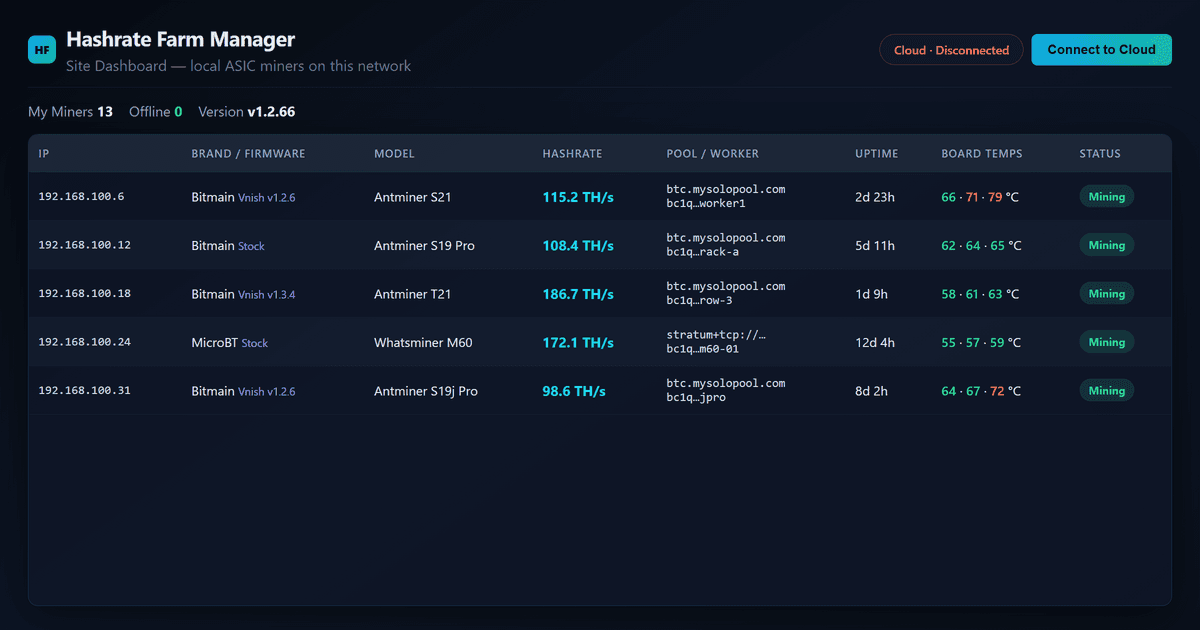
Farm Manager scans your LAN, tracks every board and fan, restarts miners from the browser, and pairs to the cloud for multi-site remote monitoring—all free locally, cloud free until 2027.
One Windows app per mining site
If you run more than a handful of Antminers, you already know the pain: spreadsheet IPs, WhatsMiner Tool in one tab, stock firmware in another, and a walk to the rack every time a board drops. Hashrate Farm Manager is our free Windows app for that job—one executable per site PC, unlimited miners, no subscription for local features.
Download it from /mining-hub/farm-manager. Double-click, scan your LAN, and the dashboard opens in your browser.
Everything included (free today)
Every feature below ships in the current release at no cost for local use:
- Automatic LAN scanning — discovers Antminer, Whatsminer, IceRiver, Bitaxe, Goldshell, and more without typing IPs.
- Live hashrate — site and per-miner TH/s (or GH/s for alt rigs) refreshed continuously.
- Per-board speed and temperature — see which hash board is lagging before you lose a chain.
- Fan RPM monitoring — catch failing fans before thermal shutdown.
- Active pool and worker name — verify stratum URL and worker strings from one table.
- Restart miners — reboot one rig or a batch from the dashboard; no rack walk required.
- Rescan / add / remove miners — refresh the fleet after you rack new hardware.
- Maintenance notes — per-miner text notes saved with your site config.
- Offline site and miner alerts — know when a site or worker drops, with “offline since” timestamps.
- Stock and custom firmware support — Bitmain stock, Vnish, and other common builds in one view.
- Browser dashboard — runs in your default browser; app sits in the system tray.
- Silent auto-updates — checks for new versions on startup and updates in the background.
- Local-first privacy — config lives next to the .exe; nothing leaves your LAN unless you opt into cloud.
- Optional LAN access — open the dashboard from other PCs on the same network.
Cloud pairing for multi-site operators
Running farms in more than one location? Pair each site PC to your hashrate.farm account:
- Generate a pairing code under Account → Farm Manager on the website.
- Enter the code on the site PC running Farm Manager.
- View every paired site from the cloud dashboard—search workers across sites, see totals, restart remotely.
Cloud remote monitoring is free through 2026. Starting 2027, we will charge a yearly subscription for cloud remote access only. The local Farm Manager app—scanning, alerts, restart, unlimited sites—stays free permanently.
Who this is for
- Home labs with a mixed fleet of S19, S21, L7, or Bitaxe boxes on one subnet.
- Hosting partners who need a honest LAN tool before they trust a third-party portal.
- Operators already on MySoloPool who want visibility into stratum workers and uptime at the machine layer.
Missing a model? Use the “Report a new model” link on the download page—we add firmware profiles based on operator requests.
Get started
Grab the latest build at Farm Manager download. For firmware downloads and pool setup guides, see mining hub firmwares and ASIC tools.
Related reading
- Announcing ASIC Manager Software — product launch, cloud pricing timeline, and multi-site overview.
- Farm Manager download page — latest Windows build and full feature list.
- Cloud Farm Manager dashboard — pair site PCs and monitor all linked locations.
Tags
Author & editorial standards
Written by Admin. Content is reviewed under our editorial policy for accuracy, operational clarity, and transparent sourcing on mining economics and hardware.
Continue This Topic
Product Announcement
Launch overview, cloud pricing timeline, and multi-site monitoring.
Download Farm Manager
Latest Windows build, feature list, and system requirements.
Cloud Farm Dashboard
Pair site PCs and monitor every linked mining location.
Mining Playbooks
Execution-focused frameworks for miner selection, hosting, and scaling decisions.